Table of Contents
faq-header&nofooter
General
What is it?
Magic Lantern is an enhancement atop of Canon's firmware that frees your Canon DSLR, allowing you to use many useful features. It is an open (GPL) framework for developing extensions to the official software.
Does Magic Lantern completely replace Canon firmware?
No. Magic Lantern runs from the card, as an add-on over standard firmware. You will still be able to access all Canon functionality.
To go back to Canon firmware, you may:
- Press and hold
SETat startup to bypass ML only once (for the current session). - Format your card in the camera and choose to remove Magic Lantern.
- Disable the bootflag (this will uninstall ML from the camera; to do this, run
Firmware Upgradeand follow the instructions).
Is Magic Lantern only for video?
No. First versions were developed by independent filmmakers and tailored for video production on 5D Mark II. Things changed when Magic Lantern was ported to smaller (APS-C) cameras, like 550D, 60D, 600D and 500D, which attracted developers interested in both still photography and DSLR video.
Is it legal?
This is a clean room / black box reverse engineering effort and as such should be OK. Frequently asked questions about reverse engineering addresses the legality question; producing an interoperable product is one of the explicit allowances enshrined in law.
Magic Lantern does not contain any Canon code. Also, we do not distribute any copyrighted code or cryptographic secrets, neither from Canon nor from any other third party. All the knowledge used for development was obtained by analyzing ARM code, by experimenting, and from lawfully obtained documentation.
Is it safe?
No. Magic Lantern was created by reverse engineering an undocumented system that controls hardware. Therefore, we can't be certain that it's 100% safe.
Magic Lantern does not replace Canon code (which is stored in ROM), but it does change the settings (which are saved to a non-volatile memory). If Magic Lantern would set incorrect values for certain settings, this may cause the camera not to boot (even without ML).
The same risk is present if you use third party software for USB remote control. These programs use the same API for changing camera settings (properties), and Canon code does not always check the validity of the settings before saving them to NVRAM. Here's a proof. Even developers of USB control software, who use Canon's own SDK, agree with this.
Imagine that your config file gets corrupted and you can't just delete it and start from scratch. We consider this a design flaw in Canon software. We did encounter such problems during development, but we were able to recover from them. For technical details, see Unbricking.
We believe the safest way to run Magic Lantern (or any third party camera control software) is to use custom modes - in these modes, Canon code does not save user settings to NVRAM.
In practice, we are doing our best to prevent these situations, and thousands of users are enjoying it without problems. However, this does not represent a guarantee - use it at your own risk.
As a precaution, the installer asks you to make a backup copy of your ROM files on the PC. That way, if something goes wrong, we have higher chances of being able to diagnose or fix the issue.
Actually, using Magic Lantern we have successfully unbricked a 5D Mark II damaged by a USB remote controller app.
Does it void my warranty?
A Magic Lantern user posted this on dpreview:
I've spoken to canon Cps (pro service in UK) and they've advised me that it's quite possible to downgrade firmware from new version to older version BUT they advised me to send it in to Canon for them to do it and test. Small service charge would be involved but could be done while I wait.
Interestingly enough, they also advised me that Magic Lantern firmware would not invalidate my Canon Warranty as it's not a hardware modification. Though I'm reluctant to find out for sure
And another user posted this on t2iforum:
I contacted Canon Support Portugal about using ML, the answer was the following:
Quote
(…) the use of custom firmware or any other third party acessory with our equpment will void the warranty of the product IF PROVEN that the malfunction of the device was caused by the use of those.
Canon respects the rights that their customers have to decide what accessories or firmware to use, although we do not recommended their use, and we are not responsible for any damage to the equipment.
The Magic Lantern firmware is distributed with NO WARRANTY and NO GUARANTEES are provided. It might work. It might not. It hasn't destroyed any cameras yet, but who knows.
How will it interact with future upgrades from Canon?
ML builds/versions are branded for a dedicated camera and an exactly matching firmware version. If Canon supplies a new firmware ML and new firmware version become incompatible after installation. Cam will not startup properly with ML card inserted. If a dev finds time to port ML to the new firmware version and changes are essential a new ML version may be there in time. However it is completely possible that this new firmware will be ignored because of lack of time. In this case you have to downgrade to previous (compatible) firmware version to make ML run again. ML project provides links to compatible firmware versions. According to Canon downgrade is not possible but we think otherwise.
Porting ML to a new firmware version is a manual (and extensive) process to find the symbols in each new version, although tools like patchdiff2, Gensig/Finsig and GPL Tools/match.py make it much easier. Each new version must be statically linked against addresses in the firmware ROM as if it were a library, which requires locating the entire set of symbols.
Despite this tight integration, Magic Lantern software does not contain any Canon code. It is entirely a clean-room implementation that runs along side the official Canon firmware as a separate DryOS task.
Is Magic Lantern available in other languages?
Currently, Magic Lantern releases do not have multiple languages built in. You can find a work in progress module that aims to translate menus here.
PS: We know there is a chinese version in the wild which is payware. This ML project team has no affiliations with it and neither endorse its usage nore support it.
Is this FAQ available in other languages?
No. If there are any they are not supported/updated/maintained and may be outdated/incorrect.
PS: If you feel encouraged to offer your assistance to translate this FAQ … we have no way to maintain it properly. It has been discussed but until we find a sustainable way to keep it up-to-date with limited man-power we have to decline your offer.
Usage
How do I bring up the Magic Lantern menus?
Press the DELETE button.
Can I start my cam without ML?
Yes, press SET before startup and keep it pressed until startup is completed.
And you can insert a card not enabled for Magic Lantern and startup cam.
Why can't I see feature X in the menu?
The feature you are looking for is probably available in a module. These are the features coming with ML programmed as loadable modules:
- Advanced Intervalometer → adv_int.mo
- Arkanoid → arkanoid. mo
- Auto Exposure → autoexpo.mo
- Benchmarks → bench.mo
- Deflicker → deflick.mo
- Auto-AFMA → dot_tune.mo
- Dual-ISO → dual_iso.mo
- EDMAC Tools→ edmac.mo
- Auto ETTR → ettr.mo
- File Manager → file_man.mo
- Image Name → img_name.mo
- Lua Script → lua.mo
- MLV Lite → mlv_lite.mo
- MLV Replay → mlv_play.mo
- MLV (Full-MLV) → mlv_rec.mo
- MLV Sound → mlv_snd.mo
- Picture Viewer → pic_view.mo
- Selftests → selftest.mo
- Silent Pics → silent.mo
Navigate to the Modules tab, load the module(s) you need (not all of them!), then restart your camera.
More info about modules: How to install and load modules
If you still can't find it, the feature is probably not available on your camera. See feature comparison table.
Which Magic Lantern build is running on my camera?
Build version is visible in Help tab/screen's bottom section. You should always provide this information if you have a question/issue to share with ML forums. Your build designation may be different, though.

Why can't I see the Magic Lantern overlays I enabled?
Magic Lantern overlays are only displayed in ML's own liveview screen(s). Global Draw must be enabled (ON) and Clear Overlays must be disabled
  for the modes you are using. Then, while in Liveview or Movie mode, press the DISP or INFO button until you are past Canon's own liveview screens.
In general, ML features that require some extra setup will be grayed out in the menu, and the help text at the bottom of the screen will tell you why.
How do I restore ML default settings?
Prefs → Config → Restore ML defaults.
Alternative: format the card and do a fresh install.
Just re-installing Magic Lantern does not change/reset existing Magic Lantern settings!
How do I erase all of the images without removing ML?
Canon menu → Format → Format card, keep Magic Lantern.
How do I record for more than 12 minutes? (Digic 4 cameras)
- H.264:
- Lower the `bitrate`_ (CBR 0.4 will let you record continuously for 30 minutes).

- Use `Movie restart`_, but you will lose a few seconds when a new file is created.

- Technically, there's no 12 minute limit. There's a 30 minute limit and a 4 GB limit, whichever comes first. With default bitrate settings, the 4 GB limit is reached after around 12 minutes (more or less).


How do I record/stream for more than 30 minutes?
- H.264:
- There is no flawless way to achieve this but a workaround:
- Use `Movie restart`_, but you will lose a few frames until a new file is created
- RAW/MLV:
- Can record continuously until the card gets full (no 30-minute limit).
- File sizes are huge; you may want to reduce resolution and/or FPS; also use a large card.
- ExFAT recommended; otherwise, when creating a new 4GB segment, the speed drops a bit and recording may stop. Don't forget to enable ExFat option in MLV menu.


- External HDMI recorder or HDMI capture device connected to PC + recording software:
- Enable the Clear Overlays feature to hide focus box in AF mode and 16:9 bars.

- Make the half-shutter button sticky (Prefs menu) to prevent the camera from turning off LiveView after 30 minutes. This method is kind of outdated. It is recommended to use:
- Experimental lua_fix build and setting “30-minute timer Disabled” in Prefs menu → PowerSave in LiveView


- USB with EOS Utility and liveview:
- Enable the Clear Overlays feature to hide focus box in AF mode and 16:9 bars.
- Make the half-shutter button sticky (Prefs menu) to prevent the camera from turning off LiveView after 30 minutes.
This method is kind of outdated. It is recommended to use: - Experimental lua_fix build and setting “30-minute timer Disabled” in Prefs menu → PowerSave in LiveView
- You need recording/streaming software able to grab liveview content like OBS.
- Resolution is fixed to 576p!
- USB with EOS Webcam Utility:
- There is no 30 minute limit and therefore no need for ML to interfere!
- Output is clean, there are no overlays!
(Some new cameras support UVC/UAC:
Cam works as webcam via USB without the need of additional software or drivers. Just plug cam into USB port and you are ready to go. Works with Windows, macOS and Linux.
Supported cameras: R1, R5 Mark II, R6 Mark II, R8, R10, R50, R50 V, PowerShot V1, PowerShot V10.
Resolution should be FHD =1920×1080 in 30 fps. Canon names it “2k”. R50 V supports 4k, 30 fps)
UVC=USB Video Class
UAC=USB Audio Class
Will I get better HDMI resolution/bitdepth/... with Magic Lantern?
At the moment ML can do nothing to enhance HDMI resolution, bit depth, frame rate, …
ML is able to bypass 29:59 time-out (see topics above) and is able to enforce VGA resolution. And of course it can force clean HDMI output: No overlays, no boxes/rectangles even with active AF.
Can ML suppress black columns left and right in HDMI streaming?
No. If your cam gives you 1920×1080 output via HDMI but “active” area is actually 1620×1080 (3:2 ratio)+ black borders left and right: Nothing ML can do about this. You may have to use tools like OBS to grab a 16:9 frame from active area and stretch 1620×911 to Full-HD.
What can Magic Lantern do to enhance "EOS Webcam Utility" performance?
Sorry, nothing ML can do about it. It's 576p for all cams.
Remark: In case you are wondering about “576p” and high-res options in subscribtion based “Pro” version: 720p and 1080p are in fact just upscaled by software algorithms.
RAW/MLV: Can't set resolution to Full-HD: "1920 is not possible in current video mode (max 1728)"

You have to enter ML's crop mode (see FAQ entry below) to activate settings above native resolution.
RAW/MLV: How to enter "crop mode"?
Press magnify/loupe/zoom button while in liveview screen. On some cams you will find an additional entry “Crop mode” in Movie tab. Despite sharing the name those modes are not identical.
How to do Open Gate recording with ML?
You can not!
Open Gate means
- Using the whole sensor area
AND
- Using every pixel in it (as in photo mode without resolution loss by binning/skipping pixels)
WITH
- Reasonable frame rate (24 fps and up)
Even for an 18 MPixel sensor it would require around 270 Megabyte/s bandwidth which is twice the fastest ML-cam can do. And there are other technical reasons restricting usage of Open Gate within ML supported cams.
You may ask why there are people talking about Open Gate with ML if it is impossible? Answer: We don't know. Maybe they use their own definition of “Open Gate”.
How do I get exposure times longer than 30 seconds?
You may use:
- `Bulb timer`_ (for a single photo).
- `HDR`_ bracketing in manual mode.
How do I see shutter counter / internal temperature?
Look in the Debug menu. Temperature will be displayed in ML's liveview overlay, too.

Can I use LiveView in complete darkness?

Yes. Increase display gain, use a low FPS (with FPS override), or both. With a bit of tweaking, you can make the LiveView bright enough to manually focus on stars, for example.
Also check out the dark color schemes optimized for night shooting, or try disabling exposure simulation.
How do I shoot timelapse?
You have a couple of options:
- Intervalometer - the classic way in photo mode. You will have to postprocess the shots in order to create the final movie. In this mode, you also have access to advanced options like ramping tools, HDR timelapse or very long exposures.
- FPS override - In video mode simply select a low FPS value (down to about 0.2 FPS) and ML will record a timelapse.
- Silent picture timelapse, to save the shutter count. For timelapse best to be combined with Intervalometer.
- For exposure ramping, the preferred method is AutoETTR followed by deflickering in post.
- For ramping other parameters, try the advanced intervalometer module.
I want to change the settings quickly, without having to press lots of buttons. Can ML help me?
Yes. Check out these features:
- Shortcut keys for commonly used functions (including push-button white balance)
- Display presets - create custom LiveView modes (for example, your favorite settings for checking exposure, focus, framing and so on).
- Config presets for all ML settings.
- Ultra fast zoom in playback mode.
- Change image review mode to PLAY - after taking a picture you can press Zoom In right away and check critical focus in a split-second.
- Navigate the menu using the scrollwheels - much faster than with arrow keys.
- Customizable menu - you can configure it to only display the essentials, so you don't have to scroll through lots of menus.
- My Menu - similar to Canon's implementation
- Junkie menu - all your important settings on a single page.
Does Magic Lantern consume more power than standard Canon firmware?
In LiveView it draws 3-5% more power (measured on 60D and 5D Mark II with zebra and focus peaking active). See this forum thread for details.
Magic Lantern can reduce power consumption by dimming or turning off the LCD screen, or by pausing LiveView without moving the mirror. See `Power saving`_ for details.
In plain photo mode with display off, the power draw is a bit higher, because Magic Lantern disables CPU powersaving features (otherwise, intervalometer and other ML functions would stop running). We have measured 6% / hour on 60D (compared to 4% / hour with Canon firmware), and 10% / hour on 5D Mark II (compared to 5% / hour with Canon firmware).
Why the audio is so quiet / noisy after disabling AGC?
You will have to adjust the volume manually; use the audio meters to determine the proper level.
Best audio is obtained by use of a preamp system fed to the camera. As a general rule, the use of a quiet preamp to send the signal to the camera will result in better the sound recorded in camera. Use of a preamped XLR adapter like the JuicedLink CX231 or a field mixer will give superior results. You may also use a recorder like Zoom H1, H2 or H4n, but since the line out level is much higher than the mic level, you will have to turn the output down from your recorder or use a pad cable.
For more info, check out the Canon DSLR Audio thread on dvxuser and AGC Disable - Magic Lantern vs. Juicedlink? on dvinfo.
How do I disable AGC on 600D/T3i, 5D Mark III, 6D and so on?
From Canon menu.
Installation
How do I install it?
Follow the install guide. You will have to copy Magic Lantern files on your card and run Update firmware from the menu. The running firmware shuts down, loads the file into RAM and starts it running. Rather than reflashing the ROMs, this new program starts the DryOS boot process to install itself.
How do I uninstall it?
Simply format the card. The bootflag will be still there, but it will generally not affect normal operation. There are two known exceptions though: EyeFi cards will not work, and startup time may be a little slower, even on non-ML cards.
To remove the bootflag, run Firmware Update from a ML card and follow the instructions.
What if I try to use it on a wrong firmware version?
It will print a message telling you so, and will invite you to take the battery out.
This was simple enough to be implemented with portable (camera-independent) code.
Does ML do any persistent changes to my camera?
Yes. Besides the bootflag (which is required for auto-boot), there are a couple of other changes to Canon settings, which are saved into flash ROM by Canon firmware. These are:
- ISO, shutter, aperture, white balance;
- Exposure compensation, drive mode;
- Picture style and associated parameters;
- Flash settings (enabled/disabled, exposure compensation, red eye reduction);
- AF points, AF mode in LiveView, focus box position;
- Exposure simulation setting (in Expo menu; disabled temporarily when using 5x/10x zoom modes);
- Backlight level (for example, it's lowered temporarily if you use `Dim display`_ for power saving);
- Autofocus is moved temporarily to back (
*) button whenever ML has to take a picture without autofocusing. This includes HDR bracketing and bulb exposures. - Autofocus is moved temporarily to half-shutter when you use `AF patterns`_, while changing the AF point;
- Sound recording is disabled temporarily when you use `FPS override`_;
- On 600D, video mode may be changed via ML shortcut key;
- On 50D, movie recording function is changed from ML menu (yes, this is a persistent Canon setting, but it's not present in Canon menus);
- On 650D, 700D and EOS M, the movie crop mode is also a persistent Canon setting, not present in Canon menus;
- AFMA values (on models that already have this feature from Canon);
- Preferred card (on models with dual card slot);
- others (the list is incomplete).
With few exceptions, these settings can also be changed from Canon menus or controls. Sometimes, ML lets you specify values outside the normal range allowed by Canon's user interface (for example: Kelvin white balance, AFMA values, intermediate ISO/shutter/aperture values).
A few settings are changed temporarily during certain operations (for example, autofocus for bracketed shots), but these settings are saved by Canon firmware in NVRAM. If you take the battery out in the middle of the operation (for example, in the middle of taking a picture), ML won't be able to restore these settings back to your initial values, and you'll have to change them back from Canon menus.
To the best of our knowledge, all these settings are restored to default values when you run Clear camera settings and Clear custom functions from Canon menu.
All persistent changes can be seen in ML source code by examining the calls to prop_request_change. Some of the changes are not persistent (for example, LiveView zoom level), and they were not included in the above list.
5D Mark III: Why are there 2 different ML versions for firmware 1.1.3 and 1.2.3 and which one should I install?
There are major differences between both firmware versions. You have to choose which one fits your needs best. Detailed explanations in first post in "5D Mark III 1.1.3" thread.
Where can I find "Stable/V2.3" version?
Stable v2.3 is outdated and no longer supported.
Some years ago dev team switched to some kind of rolling release model: Each validated change to ML code (aka: “confirm”) creates a new build.
But - essentially - Nighlty Builds are frozen since 2018. Later all work on official experimental builds stopped, too.
For those reasons it is highly unlikely to get another “stable build” in foreseeable future.
Troubleshooting
It won't boot!
- Make sure you didn't delete AUTOEXEC.BIN from your ML card. If you did, format the card, take the battery out, and reboot.
- Remove battery and card. Put battery back and start the camera without card.
- If the above works, just format the card and do a fresh install of ML.
- If it still doesn't boot, try running our diagnostic tools.
- If you still have problems, ask on the forum.
- Old versions only: if the LED is blinking continuously, you have the wrong Canon firmware version.
ML won't work with my SD-to-CF adapter
ML does not support SD-to-CF adapters. Period. If ML fails to run you are on your own.
I get an error message "Help files not found"

And you get advice to make sure you copied all files. Sorry, but this error message may be considered to be a running gag for insiders. Long story short: You have done nothing wrong and you can do nothing about it! The help files are missing for a long time and it is not known when they will come back. In the meantime you may want to access the online version (WIP): Camera Help
Where is bulb ramping?
It was replaced with AutoETTR followed by deflickering in post. Check this forum thread: Flicker Free ETTR Timelapse: - -Beginners Guide & Basic Post Processing --
This method gives much better results, compared to the old implementation. Why? Because AutoETTR attempts to minimize noise (subject to various constraints), and the deflicker algorithm also corrects variations such as quantization errors when ramping the exposure (up to 0.125 EV for shutter speed) or natural flicker.
Furthermore, the exposure and the deflicker algorithm are independent now, so you can swap out ETTR and use any exposure method you wish (such as manual ramping, Canon's Av mode, or the AutoExpo module).
You can even use the deflickering algorithm for regular pictures, to get consistent brightness in post.
For advanced ramping options, check out the Advanced Intervalometer module.
Where is movie mode remap?
We had serious problems with it, so it was disabled. The problems were confirmed with a minimal example code, so the issue is either in Canon firmware (which was probably not designed for dynamic mode remapping) or in the way we request the mode remapping procedure.
The only way to get it back is to show us a safe way to change the shooting mode. For this you need to point out what's wrong with this call: prop_request_change(PROP_SHOOTING_MODE, &new_mode, 4), and suggest a different method - which can only be done by examining Canon code and understanding how mode switching works.
Testing will not help - the probability of things going wrong is very low, but nonzero.
Why does the camera take pictures when pressing the shutter half-way?
`Trap focus`_ may be active.
Why do I have to press the shutter button twice to take a picture?
Mirror Lockup (MLU) is active.
Why is the LED blinking every 5 seconds?
You may have forgotten your camera on… with the main display off.
This is also a reminder that, when the main display is off, battery will drain faster than with Canon firmware (about twice as fast). When the display is on, the difference is much less obvious.
Why did the autofocus stop working?
It was probably moved to back button (* or AF-ON). Check your custom functions. It may happen if you take the battery out in the middle of photo shooting.
Anyway… any serious DSLR user should set AF to back button ;)
Why picture style X does not appear in movie mode?
You may need to register it from Canon menu. This is not related to ML, but people tend to blame ML for Canon quirks.
YouTube: Getting Technicolor Cinestyle to work on your T2i in video mode. - DSLR FILM NOOB
My camera freezes / I get ERR70/80/99 / I get corrupted files. Why?
- Format your card from the camera. Some of these problems are caused by filesystem corruption or cheap card readers. Always use the safe removal feature before you unplug your card from your computer.
- If you get ERR70, you will also get a crash log on your card. Please send this file to developers.
- Run the stability tests from the Debug menu. If the tests fail, report a bug and send your config file to developers.
- Make sure the problem goes away with stock Canon firmware.
- If yes, it's probably a ML bug. Find a way to reproduce it with the latest nightly build, and report it on the issue tracker.
- Otherwise, it's probably a hardware issue - try a different card, card reader, lens or whatever else might be relevant to your particular problem.
- To report bugs, please use the issue tracker.
- For general questions, installation issues, or for assistance with potentially bricked cameras, please use the forum.
What about ERR20 when taking pictures?
This problem is not related to (or caused by) Magic Lantern.
You will get this error when your shutter mechanism no longer works properly. Contact your Canon service center.
Consider entering your shutter count in the Camera Shutter Life Database.
Why feature X doesn't work properly?
- Read the manual. Some features may not be 100% intuitive, or it may be a known issue.
- If you suspect a ML bug, find a way to reproduce it with the latest nightly build, and report it on the issue tracker.
During installation error message "ML directory not found! Please copy all ML files." appears
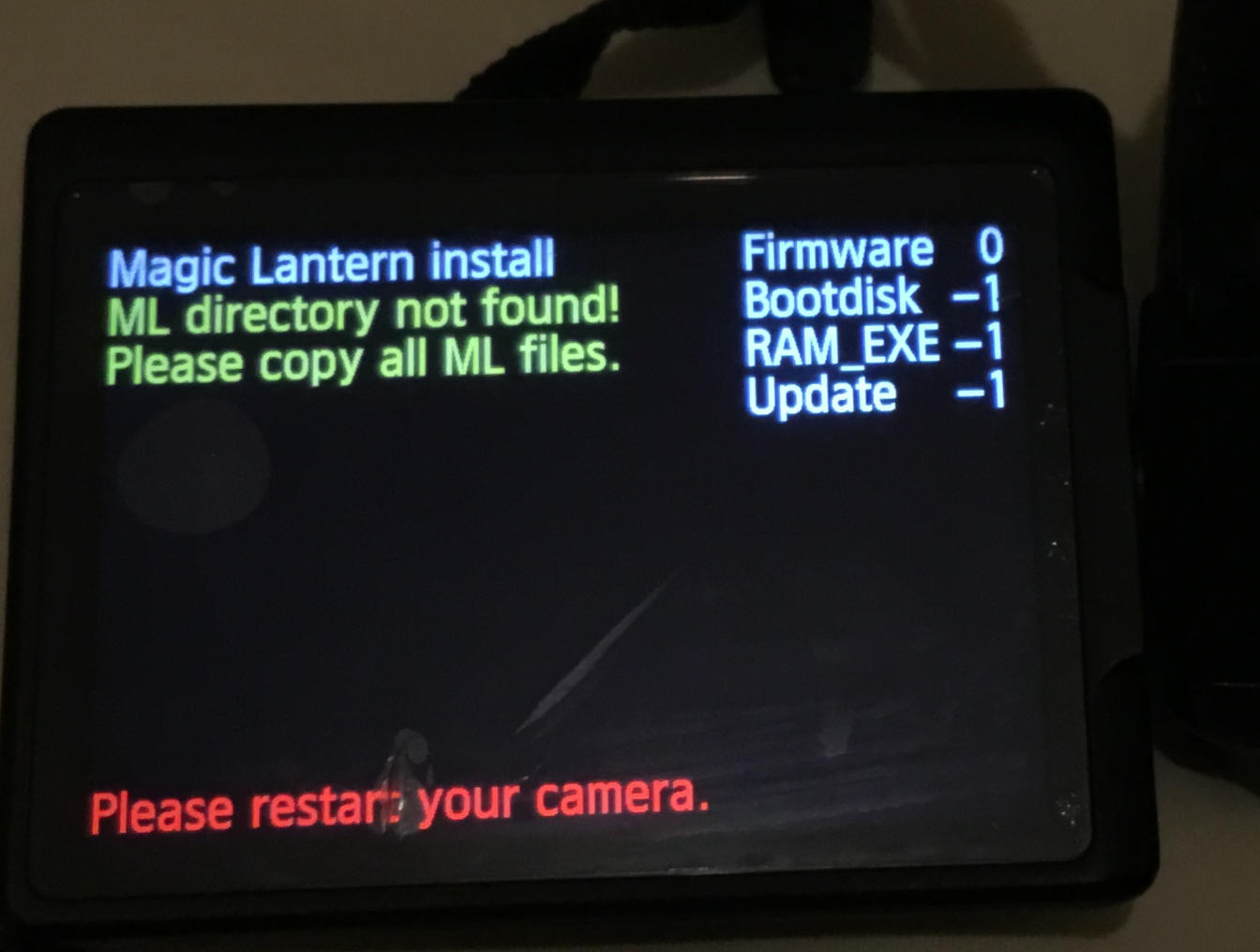 Known bug with Big Sur (macOS 11.x) and flash memory cards with ExFAT file system.
Workaround: Format card with FAT32 file system and proceed with installation as before: Copy extracted build files and directories to card, insert card to camera and use Canon Firmware Update option to install again. Error will not be seen this time.
After installation and startup it is recommended to format card inside camera with “Keep ML” option. Camera will apply ExFAT file system again and ML will rewrite files and directories to card automatically.
For details see Folders created by macOS Big Sur on exFAT cards are unreadable in Canon EOS cams
Loading MLV_SND.MO failed "tcc: error: undefined symbol 'mlv_rec_[...]'"
 MLV_SND.mo requires MLV_REC.mo to run.
Make sure to have MLV_REC.mo activated, too.
Technical
Does it work with CHDK?
We have used some of the CHDK tools to learn about Canon firmware files, but this is all new code. They have done an amazing job of supporting hundreds of different camera models across multiple architectures and operating systems. At some point in the future chdk might be ported to the 5D Mark 2, but this project is much more focused on just the 5D Mark II and the needs of film makers. CHDK is a great project for Canon's Point-and-Shoot cameras. Without their initial effort in understanding DryOS, Canon's firmware files and the boot process, I wouldn't have been able to make as much progress as quickly as I did. While I was able to use modern tools to analyze dump files of ROM images thanks to their efforts, they got started bitbanging a UART via the status LED on a camera body. That's truly hardcore.
Why the name change?
Originally the project was called just 5D Mark Free, but out of an abundance of caution it seemed best to avoid Canon's trademarks.
What is it written in? Can I get the source?
The firmware hack is in C, with some inline assembly for boot strapping. The firmware build tools are in Perl and use Makefiles for dependency tracking. You need an arm-linux-elf build of gcc and binutils. Most of the code analysis has been done with objdump, strings and the IDA demo. No tech support will be provided. If it breaks you get to keep both pieces. If you know what all of these terms mean and aren't scared of the possibility of breaking your camera, you can download the Magic Lantern firmware source code.
How do I get a ROM0.bin firmware image?
We do not distribute ROM images, nor IDA .idb files, since they are verbatim copies of Canon's copyrighted code. You can find the ROM images from your own camera under ML/LOGS on your card.
What are all of the 0xff81beef things and funny names like EP_SetManualMovieMode()?
These are the addresses in the official ROM firmware for different functions and names that we have given to functions. If you load the ROM0.bin image into IDA or use objdump you can trace through the instructions to determine how the software works. If you are just using the camera, they don't need to mean anything to you, but they give other developers a place to look in the firmware image.
The function names are unlikely to be the same as the ones in Canon's source code, which we have never seen. We name functions based on what they seem to do, or debugging / diagnostic strings embedded in the function. It isn't perfect, but it is sufficient to locate the important things for task creation, file I/O and GUI operation.
ML Development
The project is dead, right?
Not dead yet!
Here is some status update for all users (and devs). Warning, long read! Posted April 2023:
https://www.magiclantern.fm/forum/index.php?topic=26852.msg242979#msg242979
Here is a dev/programmer oriented write-up about build concerns and stuff. Warning: Deep tech lingo!
https://www.magiclantern.fm/forum/index.php?topic=26814.msg245407#msg245407
More updates in linked thread.
Can't you use ChatGPT (or other AI) to help developing/porting?
Nope, won't work!
ChatGPT's fame in programming is largely based on having access to vast amounts of freely distributed data and code (as in Stackoverflow) accumulated over years.
This doesn't apply to ML development. Canon never published its code or tools involved creating it. It is a very, very small community trying to make sense of what is found in camera (aka: reverse engineering).
ChatGPT simply doesn't know what is going on.
Misc
Has Canon contacted you?
No one at Canon has contacted us regarding Magic Lantern or software development for their DSLR cameras. We are very eager to discuss the project with them, however, so if you have any technical contacts inside of Canon's software team, please put them in touch with us.
Troll Questions
Ask one of those and you may get banned from our forum ;)
When will we be able to shoot in our Canon 100 fps, 200 fps, 1000 fps!?
When you buy this camera and slap a Canon sticker on it.
My Sony camera can record 1080p @ 60fps, why my 650D can't?
Because the 650D isn't your Sony camera.
I am new here I dont know anything about coding [...] I want to be able to shoot Raw and 4K
Why stop at 4k? Why not 8K?
Download the 16K firmware and give it a try. Here's a sample video.
Why is it so difficult to change the LiveView resolution, when elements like bit rate control and HDR video seem to be relatively easy to implement?
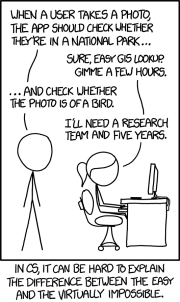
Knowing where to tweak which register values to get other resolutions is as simple as translating a pile of Egyptian glyphs.
Canon has announced that the SX280 will shoot 60fps at 1080p and a 14 fps Burst rate. I am sure the Digic 6 can easily handle the double of both rates.
How exactly did you reach this conclusion?
Any progress on XYZ?
If you can't find anything about it in the relevant forum thread, it's safe to assume there was none.
If you are interested in XYZ and have the skills to improve it, feel free to do so and submit a pull request.
If you don't have the right skills, asking this question will only serve to annoy those who might have them. Doing some research about XYZ and sharing your findings would be much better - this may encourage others to take a look at it.
When will you implement XYZ?
When it's ready.
Don't forget that Magic Lantern is a spare-time project, so the progress is not always as quick as we would like. More info here and here.
Not only that, but the nature of development, especially the kind of reverse-engineering that goes on in the case of something like ML, is unpredictable. A single issue might be fixed in five minutes, or it may take weeks, months or years to solve. One notable example is the shutter bug on EOS M, where the issue takes place on a secondary processor not directly controlled by Magic Lantern (so, after some hundred hours of research spanned over several years, the conclusion was that a fix is much more difficult than we could have imagined).
→ Avoid asking for ETAs - it’s more rude than you may realize!
When are you going to work on XYZ?
When we will get around to it.
As surprising as it may seem, we actually have families and lives that involve things other than Magic Lantern. This is a hobby project, we enjoy working on it, and we enjoy seeing you using it. We don't particularly enjoy getting nagged about doing things.
→ Remember that people do free work because it is fun, not to get stressed by strangers!
Will ML ever be available for 999D?
(999D = any camera model not yet supported)
If you start to learn C, Assembler and reverse engineering embedded devices with ARM architecture and are willing to put several hundred hours of work into it: Sure, there will be!
How long it will take to have ML on 999D?
Estimated: at least several hundred hours for the initial port, without including maintenance or advanced features (such as raw video).
In practice:
- assuming a developer were employed to work on this port full-time: at least 2-3 months, without any guarantees of success.
- assuming a developer dedicates 20 minutes/day on average to this particular port: about 3 years.
- if everybody waits for somebody else to complete the port: code doesn't grow on trees. Sun entering red giant phase, proton decay and such things… might actually happen first ;)
Why camera model 999D isn't supported yet?
Why feature XYZ isn't implemented yet?
Why bug XYZ isn't fixed yet?
One of these:
- Because nobody has written the code for it. Code doesn't grow on trees ;)
- Some things are genuinely difficult - or impossible to achieve - on current Canon hardware.
→ Why I Haven’t Fixed Your Issue Yet (long answer)
→ Consider learning to code.
Why are you working on 40D while I'm waiting for ML on 5D Mark IV?
It's a volunteer project. People work on whatever they find fun or interesting, on whatever camera they have.
People who work on 40D probably don't have a 5D Mark IV in their hands.
→ Consider donating and/or learning to code.
I'm tired of waiting for XYZ, going to jump ship to Sony / BMPCC / whatever!
Good luck!
When will you release the next version?
As soon as some new feature / bug fix becomes good enough for us, it will be included in experimental builds.
Once it's confirmed to work - or at least fall back nicely - on all supported models, without breaking too much of the existing functionality, it will be included in the main builds.
When will you release the next *stable* version?
As soon as you will provide us with clear and concise testing and bug reports for all ML features from the nightly builds.
Since this did not happen for the past few years, and we no longer have the time and resources to do the testing ourselves, there are currently no plans for a new stable release.
However, the nightly builds can now be considered somewhat stable, and if something important breaks, it's usually fixed quickly if you report the issue.